



USE CODE: CCMRT25
AFTER YOUR FREE TRIAL TO SAVE 25% UNTIL OCTOBER 10, 2026.

AFTER YOUR FREE TRIAL TO SAVE 25% UNTIL OCTOBER 10, 2026.

FEATURING, 20+, LIVE, ZOOM SESSIONS PER WEEK.
Level based instruction is fine for some. An artist enjoys level 1, then level 2, maybe even level 3… but then what? If there’s no level 4, 5 or 6, many of us end up looking for a new program where we’re expected to start at level 1 again.
The Cartoon Coach virtual drawing gym was created by observing the training found in Gyms, Dojos and Yoga Studios.
We developed the Locus of Focus; a holistic approach to art instruction where artists of any age, or skill level, can build, within themselves, an ecology of core values they will carry with them for life.
The Locus of Focus, itself, is a powerful frame work that can be adapted for many other areas of life.

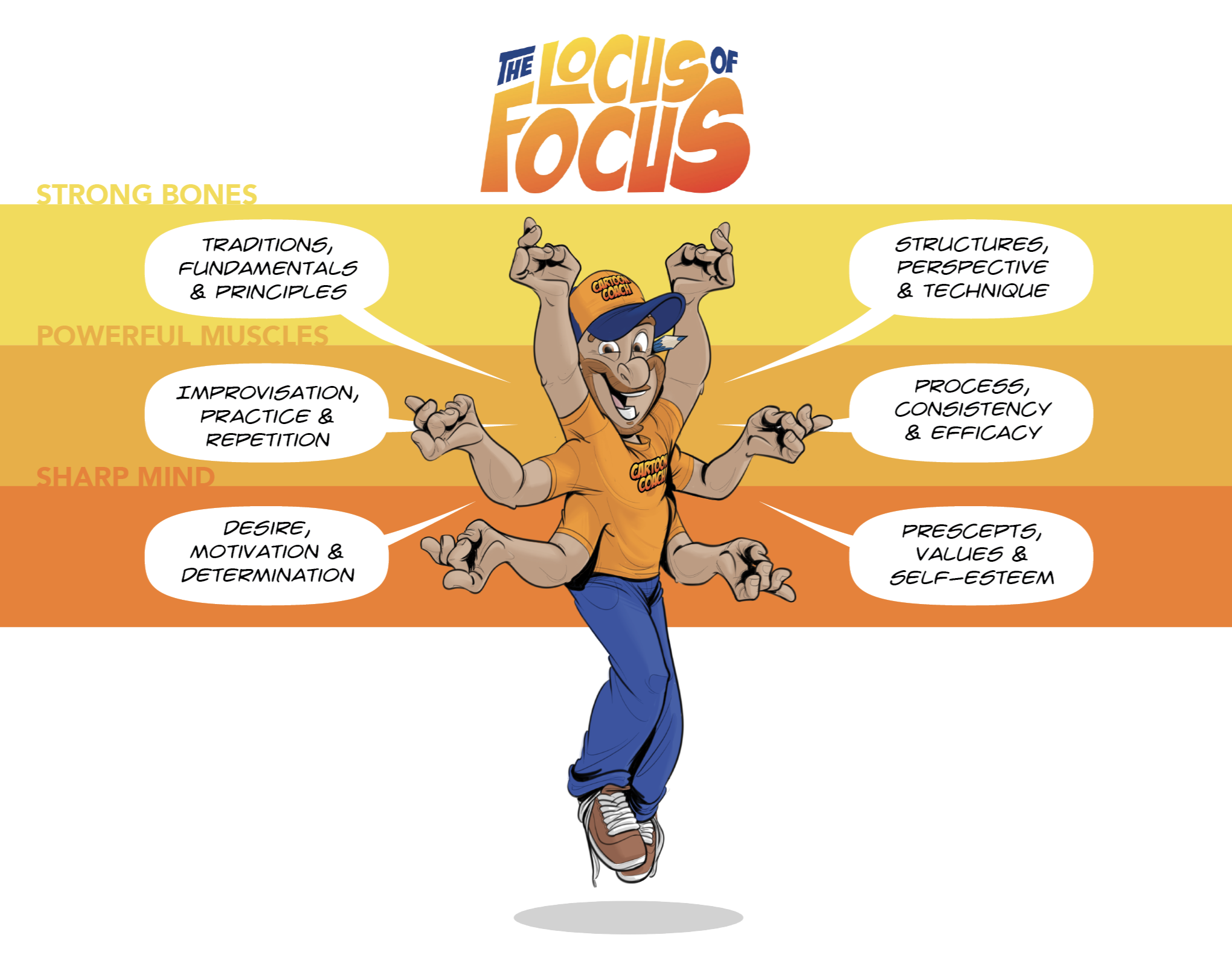
Strong Bones: Represents the traditions, art-fundamentals and principles that become the framework with which we build upon.
Powerful Muscles: Represents the creativity, imagination and technique that require consistent stretching, exercise and practice.
Sharp Mind: Represents our desire, motivation, determination, patience, and positive internal dialogue to help stay on track towards achieving goals.
To encourage this philosophy, this discipline, that I believe in so much… I now offer; UNLIMITED MONTHLY MEMBERSHIPS at a reasonable price.
For 45$ a month, a dedicated artist can take full control of their future.
At 1 session a week, an artist is sure to remain inspired.
At 2 sessions a week with daily practice, artists will begin to witness their own progress in real-time.
Should an artist choose to attend 3+ sessions a week, practice daily and set achievable goals… that level of dedication is incendiary and your champions will be astounded by the fireworks.




Using your phone for general admin tasks on your dashboard like; renewing your membership, checking your sessions balance or booking and cancelling sessions is perfectly fine, however, it is not recommended to participate in an actual session/class through your phone.
For an optimal Cartoon Coach experience, please use a larger device like a tablet, laptop, stationary computer or, you can even participate by, either installing directly on, or screen mirroring, using: Amazon Firestick, Chrome Cast, Google TV Streamer, AppleTV or a ZOOM compatible Smart TV. Please take the time to make sure to make sure your device of choice is compatible with the latest ZOOM updates.
The following information will help guide you through the processes of Booking Sessions, Setting-up Recurring Sessions, Cancelling Sessions and Adding more sessions. Additionally, we’ve removed the sibling discount as you only require one-membership per household. More documentation will follow as the program evolves over the coming months.
Once logged-in to your dashboard, you can view the weekly schedule, book sessions, check your session balance and purchase more classes.
Over the coming months, your dashboard will be, regularly, updated with so much more.

Once logged-in, click on “book a class” (online) or “Book” located under the “Bookings” tab (online/phone app). The next thing you will see is a calendar. Online, it will appear as a grid where you can view all the weekly sessions at a glance. On the phone, you will need to click on the date of the session you wish to book for the calendar to reveal bookable sessions. For example: if you currently enjoy sessions on Thursday at 5:30, click on the soonest Thursday and you will see all the available sessions for that day. Once you’ve decided on a session, click/tap “Book” then click/tap “confirm” and you’re all set. You will receive a booking confirmation in your email and reminders leading up to that session.

If you or your artist prefers a single weekly recurring session. Follow the same steps as above, but after you’ve clicked “book” make sure you select “Recurring Booking” (online) or “Make this booking recurring” (phone app).

As always, you get every class you pay for, regardless of the notice or cancelation reason. We, certainly, appreciate notice when it is possible. Online, locate the “Bookings” tab on the dash board and click on the “trash” icon that corresponds to the session you wish to cancel. On the phone app, navigate to the calendar, as you did when you booked the session, click on the session you booked and a pop-up window will appear with the option to cancel. Click “Cancel”. In both scenarios, you must click “Confirm” to finalize the cancellation. Once you have confirmed the cancellation, a credit will be returned to your session balance. Online, you may not see the balance increase immediately, refresh the page.

Your Cartoon Coach membership is no longer tethered to a specific individual in your household. Anyone who is present in your household when a booked class is in session is welcome to participate. Siblings, parents, friends, your nosy neighbour, even your Aunt Esther who, for some reason, feels it’s ok to gift-wrap old junk from her musty, old, spider-infested house when she finally remembers your birthday, 2 months and 14 days too late. One membership per household is all that is necessary if the artists are attending the same session.